












Australia eSIM and Travel Guide: Stay Connected Down Under
Essential travel information, mobile internet advice and useful tips for your journey to Australia.
Australia: A Land of Contrasts and Connectivity

Australia, the world's smallest continent and largest island, is a land of stunning contrasts, from sun-drenched beaches and ancient rainforests to the vast, red deserts of the Outback. Whether you're planning to explore the cosmopolitan streets of Sydney, dive the Great Barrier Reef, or embark on a road trip along the Great Ocean Road, staying connected to reliable mobile internet has become an essential part of modern travel. Reliable data allows you to navigate unfamiliar cities and remote highways with GPS maps, book last-minute accommodation or transport, and access digital tickets for flights, trains, and attractions. It also keeps you in touch with family and friends through messaging and video calls, helps with language translation if needed, and provides access to emergency information or travel updates.
For digital nomads and remote workers, a stable internet connection means you can stay productive while enjoying the Australian lifestyle. While many cafes and accommodations offer free Wi-Fi, public networks can be slow, insecure, or unavailable, especially in rural areas. This is where an eSIM can be a practical solution. An eSIM is a digital SIM card embedded in your smartphone, allowing you to activate a local or travel data plan without needing a physical SIM. It can be a convenient alternative to swapping out your home SIM or paying for your operator's roaming service. However, it's not a one-size-fits-all solution, and costs vary, so it's wise to compare options.
This guide will walk you through Australia's mobile internet landscape, the major network operators, must-see sights, cultural insights, and how to activate and use your eSIM for a smooth travel experience.
Mobile Internet in Australia: What to Expect

Australia's mobile internet infrastructure is generally robust in urban and suburban areas, with widespread 4G LTE coverage across major cities like Sydney, Melbourne, Brisbane, Perth, and Adelaide. 5G networks are expanding rapidly in these metropolitan centers, offering faster speeds where available, but it's important to note that 5G is not yet ubiquitous and coverage can be patchy even within city limits. If your device is 5G-compatible and your eSIM plan includes 5G access, you may enjoy enhanced performance in certain areas, but it's not guaranteed.
Venturing beyond the cities reveals a different picture. In regional towns and popular tourist hubs such as the Gold Coast, Cairns, and Hobart, 4G coverage is typically reliable, but speeds might be lower than in city centers. However, once you head into rural and remote Australia—the vast Outback, national parks, and along some coastal highways—mobile reception can become sparse or non-existent. It's not uncommon to lose signal entirely in places like the Nullarbor Plain, parts of the Kimberley, or deep in the Tasmanian wilderness. Even some well-visited natural attractions, such as Uluru-Kata Tjuta National Park, may have limited connectivity in certain spots.
Indoor coverage in cities is generally good, but thick building materials, basements, and shopping centers can sometimes weaken signals. During busy periods, such as major festivals, sporting events, or holiday seasons, network congestion can lead to slower data speeds, as many users compete for bandwidth. Factors like your device's antenna quality, the specific frequency bands it supports, weather conditions, and even local topography can affect connectivity. It's important to have realistic expectations: while an eSIM can keep you connected in most populated areas, it's wise to download offline maps and have a backup plan for communication when exploring truly remote regions. Remember, actual coverage and performance depend on your location, device compatibility, network infrastructure, and the specific partner network your eSIM plan uses.
Major Mobile Network Operators in Australia

Australia's mobile network market is dominated by three major network operators that own and maintain extensive national infrastructure: Telstra, Optus, and Vodafone. There are also numerous Mobile Virtual Network Operators (MVNOs) that resell access to these networks, often under different brand names. When you purchase a travel eSIM for Australia, the provider typically partners with one or more of these underlying networks to deliver service. The specific network your eSIM will use depends on the plan you select, and not all eSIMs offer access to multiple operators.
- Telstra: Telstra operates Australia's largest and most widespread mobile network, with the broadest coverage in rural and remote areas. It's often the default choice for travelers venturing off the beaten path, though no network can claim 100% coverage. Telstra has invested heavily in 5G, with coverage in major cities and many regional centers.
- Optus: Optus is the second-largest network, with strong coverage in metropolitan areas and most regional towns. Its 5G rollout is also well underway, particularly in city business districts and popular suburbs. In some rural locations, Optus may have slightly less coverage than Telstra, but for most tourist routes it provides solid service.
- Vodafone Australia: Vodafone offers competitive coverage in cities and larger regional centers but may have more gaps in remote areas compared to Telstra and Optus. It has been expanding its 4G and 5G footprint and can be a reliable choice if your travels are concentrated in urban or coastal regions.
Some eSIM plans may connect to a single network, while others might offer access to two or more. However, automatic network switching is not universally available. Your device will usually remain on the network assigned by the eSIM profile unless you manually select an alternative (if permitted). It's also worth noting that 5G access varies by plan; many travel eSIMs only include 4G/LTE to keep costs manageable. Always check the plan details to understand which network(s) you can use and what technology is included. MVNOs such as Boost, Amaysim, and Aldi Mobile use the infrastructure of these major operators, but your eSIM will connect directly to the host network, not the MVNO, unless specified.
Exploring Australia: Must-See Destinations and How Connectivity Helps

Australia offers an incredible array of sights and experiences that cater to every type of traveler. The bustling cities are cultural melting pots, the coastline is lined with world-famous beaches, and the interior holds ancient landscapes steeped in Aboriginal history. Here are some highlights to inspire your itinerary.
- Sydney: The iconic Sydney Opera House and Sydney Harbour Bridge dominate the harbour. Bondi Beach beckons surfers and sunbathers, while the Royal Botanic Garden and The Rocks historic district offer contrasting urban escapes. Use your mobile data to book a bridge climb, check ferry timetables, or find the best coffee spots—Sydney takes its flat whites seriously.
- Melbourne: Known for its laneway art, coffee culture, and sporting obsession, Melbourne rewards exploration. Stroll through Hosier Lane for street art, catch an Australian Rules Football game at the MCG, or take a day trip along the Great Ocean Road to see the Twelve Apostles. Mobile internet helps with navigating the tram network and securing tickets to exhibitions at the National Gallery of Victoria.
- Queensland's East Coast: From the Great Barrier Reef off Cairns and Port Douglas to the Gold Coast's theme parks and the Whitsunday Islands' white sands, this region is a sun-seeker's paradise. Use your connection to book dive trips, check weather conditions, or share photos of the vivid corals and rainforests.
- Uluru-Kata Tjuta National Park: In the heart of the Northern Territory, Uluru (Ayers Rock) is a deeply spiritual monolith. Learning about the Anangu people's connection to the land is a profound experience. While coverage is limited, you can plan your visit online and download interpretive materials beforehand.
- Tasmania: This island state is a haven for nature lovers, with Cradle Mountain, Freycinet National Park, and the MONA museum in Hobart. Offline maps are essential here, but connectivity in towns ensures you can research walks and accommodation.
- Perth and Western Australia: Relax on the beaches of Perth, explore the Margaret River wine region, or swim with whale sharks at Ningaloo Reef. The distances are vast, so reliable mobile service is crucial for navigation and emergency calls, though remote stretches may lack signal.
Throughout your travels, having mobile internet can enrich every moment. Use translation apps to understand Aboriginal place names or menus featuring local ingredients, access real-time public transport updates, or book last-minute tickets to popular attractions like Penguin Parade on Phillip Island. It also allows you to share your experiences instantly, though it's equally valuable to sometimes disconnect and soak in the scenery.
Australian Culture, Facts, and Practical Tips for Travelers

Australians, or "Aussies," are renowned for their laid-back, friendly nature and a strong sense of equality. The country is built on immigration, resulting in a vibrant multicultural society where you'll hear languages from every continent and find a staggering variety of food. Here are some cultural nuances and practical observations for a more rewarding trip.
- Food and drink: Australian cuisine is a melting pot itself. While you'll find excellent fine dining, everyday staples include the humble meat pie, sausage sizzle (a fundraiser barbecue), and fish and chips by the beach. Vegemite, a salty yeast spread, is an acquired taste—spread it thinly on buttered toast. Coffee culture is an art form; a "flat white" or "long black" are local favorites. The wine regions of Barossa Valley, Yarra Valley, and Hunter Valley produce world-class wines. Don't miss fresh seafood like Sydney rock oysters or barramundi.
- Festivals and events: Australia loves a celebration. Vivid Sydney transforms the city with light installations, the Melbourne International Comedy Festival draws top talent, and the Sydney Gay and Lesbian Mardi Gras is a spectacular event. Sporting events like the Melbourne Cup horse race and the Australian Open tennis tournament grip the nation. Regional shows (agricultural fairs) offer a glimpse of rural life.
- Everyday life and etiquette: Australians generally value directness and a sense of humor. Tipping isn't as ingrained as in the US, but rounding up the bill for exceptional service is appreciated. Queuing patiently is expected. When on public transport, give up your seat for the elderly or pregnant. The "thumbs up" sign is positive, but some hand gestures can be offensive in certain contexts.
- Travel practicalities: Distances are enormous—flying between capital cities is common. Driving is on the left, and seatbelts are mandatory. Sun protection is serious: the Australian sun is harsh, so wear sunscreen, a hat, and sunglasses even on cloudy days. In the north, the "wet season" (Nov–Apr) can bring tropical cyclones, so check weather reports and have a contingency plan. Your eSIM can help you stay updated on weather warnings and road closures.
- Indigenous culture: Australia's Aboriginal and Torres Strait Islander peoples have the world's oldest continuous cultures. Take time to learn about the land's traditional owners, whether through a guided walk, an art gallery, or a cultural center. Respect their customs, lands, and stories.
- Lesser-known gems: Escape the crowds at Kangaroo Island (SA) for wildlife, the Daintree Rainforest (QLD) for ancient flora, or the Blue Mountains (NSW) for dramatic scenery. In the outback, towns like Broken Hill offer a raw, historic perspective.
How to Activate and Use Your eSIM for Australia
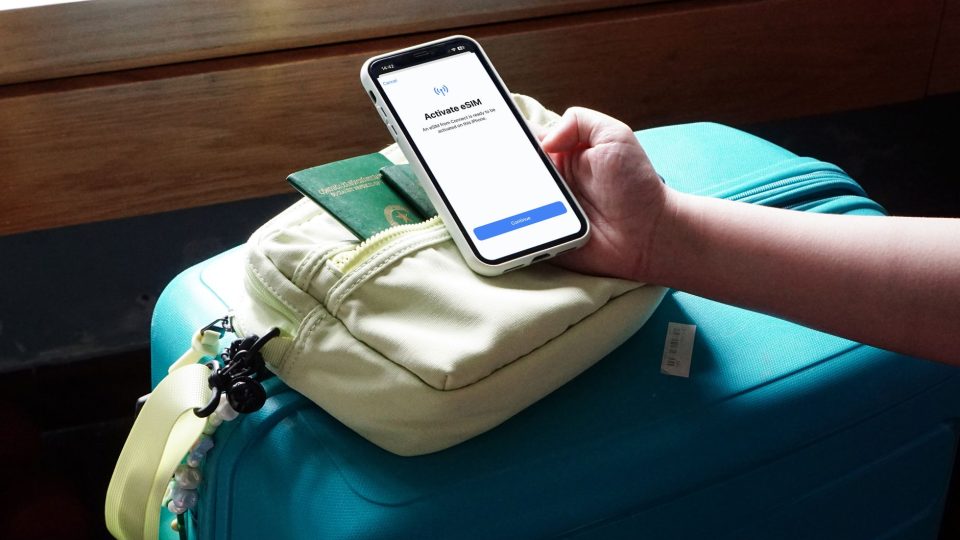
Before your trip to Australia, setting up your eSIM correctly ensures you’ll have internet access as soon as you land, without the hassle of finding a local SIM vendor. However, activation procedures can vary between providers, so always follow the specific instructions provided with your purchase. Here are the general steps and tips:
- Check device compatibility: Not all phones support eSIM. Generally, recent iPhones (XR and newer), Google Pixels (3 and newer), and high-end Samsung Galaxy models have eSIM capability. Check your device’s settings for an option to add a cellular plan, or consult the manufacturer. Your phone must also be network-unlocked to use an eSIM from a third-party provider.
- Install while connected to Wi-Fi: Most eSIMs are installed by scanning a QR code or entering an activation code manually. This requires an internet connection, so do it at home, at your hotel, or an airport Wi-Fi hotspot before you lose access. Keep your QR code or activation details safe—you may need them if you encounter issues.
- Follow the installation prompt: On your phone, go to Settings > Cellular/Mobile Data > Add eSIM (or similar). Use your camera to scan the QR code, or enter the details manually. Label the plan clearly (e.g., “Australia Travel”) to distinguish it from your primary line.
- Configure your lines: Once installed, set the eSIM as the default line for cellular data. Keep your primary line for calls and texts if needed, but disable data roaming on that line to avoid accidental roaming charges. You can usually choose “Allow Cellular Data Switching” off to prevent the phone from using your home SIM for data.
- Enable data roaming if required: Many travel eSIMs require you to turn on Data Roaming for that line, even though it’s a local plan. Without this, data might not work. Check your provider’s instructions.
- Activation timing: Some eSIMs activate immediately upon installation, while others only activate when you connect to a supported network in Australia. For this reason, you may see "No Service" or "Activating" until you arrive. Don’t panic—just ensure everything is set up correctly.
- Avoid deleting the eSIM: Unless the provider explicitly states you can re-download it, deleting an eSIM often makes it unrecoverable. If you run out of data, you usually need to purchase a new plan. Contact support before removing it.
- Troubleshooting: If you don’t get a connection upon arrival, try restarting your device, toggling Airplane Mode, or manually selecting a network (if allowed). Check that the APN settings match what your provider recommends—some eSIMs require specific APN entries. If problems persist, contact your eSIM provider’s customer support through their app or website.
By setting up your eSIM before departure, you can step off the plane in Sydney, Melbourne, or Perth and immediately access maps, transportation apps, and messages. Just remember to keep your primary SIM’s roaming charges in mind, and enjoy a seamless connected experience in Australia.
Ready to travel to Australia?
Choose your eSIM before departure and connect to mobile internet as soon as you arrive.